TRUSTED BY 90 MILLION USERS
PDF Reader Pro is an all-in-one PDF solution for Windows—easily edit, sign, fill forms, convert, and annotate PDFs. It is a practical, high-value Adobe Acrobat alternative for professionals, students, and everyday document work.
KEY FEATURES
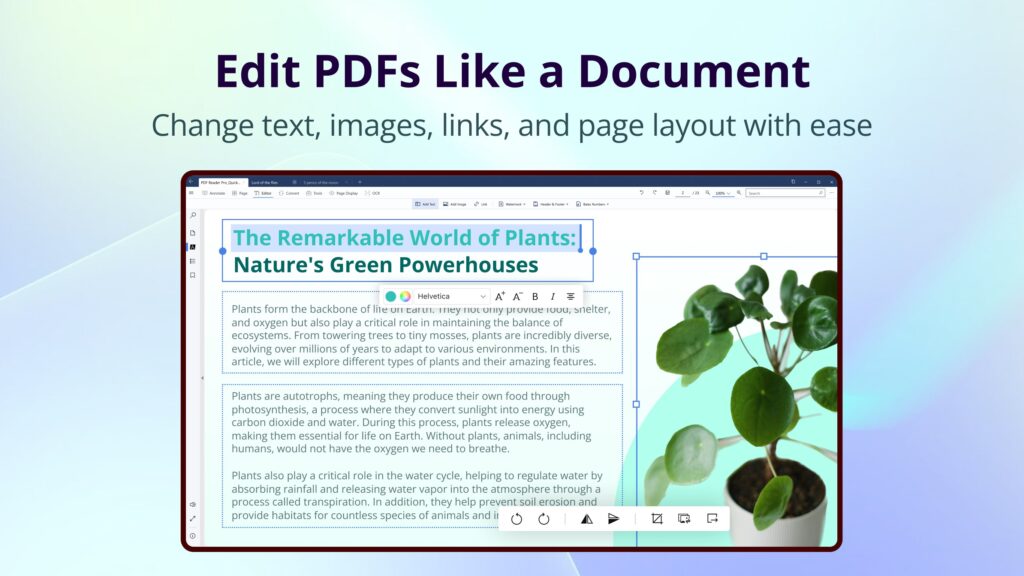
• Edit PDF text, images, and pages.
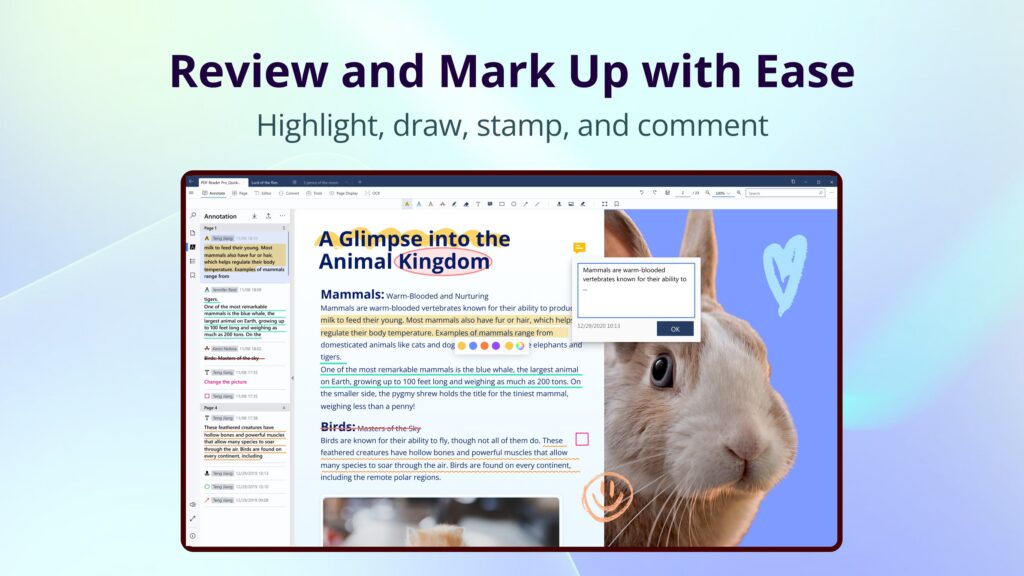
• Annotate PDFs with 15+ tools.
• Convert PDFs to Word/PPT/Excel/images and more.
• Merge, insert, split, and rearrange PDF pages.
• Compress PDFs.
• Protect PDFs with passwords, watermarks, and more.
• Create electronic signatures.
• Batch process multiple PDFs.
PDF READER
• Vertical or horizontal scrolling; single-page, two-page, or full-screen modes
• Multi-tab viewing: Open multiple PDFs in one window
• Search text in PDFs
• Create bookmarks and outlines for quick navigation
• Dark mode for reading in low-light environments
• Listen to selected text with text to speech
• Multiple custom themes for different reading preferences (Pro)
• PPT slideshow mode and text-only mode (Pro)
• Split view: View different pages of the same document simultaneously (Pro)
PDF ANNOTATOR
• Mark up PDFs with highlight, underline, strikethrough, squiggly, freehand, shapes, text boxes, sticky notes, and more
• Stamps: Add custom or dynamic stamps (Pro)
• Links: Insert links to PDF pages, websites, or email addresses (Pro)
• Images: Insert custom images to enrich your files (Pro)
• Export/import annotations: Supports XFDF files (Pro)
PDF EDITOR
• Edit text: Correct PDF text and adjust font style, color, and size (Pro)
• Edit images: Rotate, crop, replace, delete, and rearrange images (Pro)
• Add headers, footers, page numbers, and Bates numbers (Pro)
• Create flattened copies to keep PDF content static (Pro)
PAGE EDITOR
• Extract specified PDF pages (Pro)
• Insert pages from another PDF or blank pages (Pro)
• Split by page range or divide a document evenly into multiple documents (Pro)
• Replace selected pages with pages from another PDF (Pro)
• Rotate, rearrange, copy, paste, and delete pages (Pro)
PDF CONVERTER
• Image to PDF: Convert JPEG, JPG, PNG, BMP, TIFF, and GIF images to PDF
• Convert PDF to Word, Excel, CSV, PowerPoint, HTML, TXT, and RTF (Pro)
• PDF to Markdown: Extract clean, flexible, editable content (Pro)
• PDF to JSON: Extract structured text, table, and image data (Pro)
• PDF to Image: Supports JPEG, PNG, JPG, GIF, TIFF, TGA, BMP, and JPEG 2000 (Pro)
• Configure worksheets, layouts, table extraction, HTML pages, JSON content, image formats, and resolution (Pro)
OCR TEXT RECOGNITION
• Scan PDFs with OCR to create editable or searchable PDF and TXT files (Pro)
• Automatically detect document languages or manually select OCR recognition languages (Pro)
• Extract text from selected areas, then copy or export the recognition results (Pro)
• Enable OCR during PDF conversion and image-to-PDF conversion (Pro)
COMPRESS PDF
• Compress PDFs to reduce file size and customize export quality (Pro)
MERGE PDF
• Merge multiple pages or PDFs into a new PDF (Pro)
FILL PDF FORMS
• Fully supports static forms compatible with Adobe Acrobat Reader (Pro)
• Fill interactive forms with text fields, checkboxes, radio buttons, combo boxes, list boxes, and more (Pro)
SIGN PDF
• Create electronic signatures with the keyboard, trackpad, or an image, then add them to PDFs (Pro)
PDF SECURITY
• Watermarks: Add text or image watermarks and save them as templates (Pro)
• Encryption: Set an open password and permissions for copying and printing
• Remove passwords from permission-protected PDFs (Pro)
BATCH PROCESSING
• Batch compress, password-protect, watermark, and convert PDFs (Pro)
*Features marked Pro are paid features. We offer a 7-day free trial during which you can use all Pro features.
If you have questions or suggestions, contact us.
Email: [email protected]
Website: https://www.pdfreaderpro.com
Powered by ComPDF: https://www.compdf.com/
Contact ComPDF: [email protected]